You move your cursor to the text tool ( button with an A symbol ) and click it and now your eyes are looking for vertical text option in Property Bar. But soon you realize that there is no option to write text vertically. What!
Lot of people at this point just say no problem still i can use the Enter Key on the keyboard, and the problem is solved. You later realize that it was a pain rather than relief, if client asks to change the text in the design.
At CorelDraw forums the best solution i could find was our trusty Character and Enter method.
https://coreldraw.com/forums/t/10072.aspx
There is a very simple solution for writing the text vertically in your designs when using Coreldraw rather than rotating every character or the plain old Enter technique.
UPDATE: In newer versions of corelDRAW we do not need to open the options just drag the right paragraph text handler inside and the characters adjust accordingly.
The Solution
After typing your text do this
Step 1
Convert it to paragraph text if its Artistic Text ( You may change it to Artistic later On )
Step 2
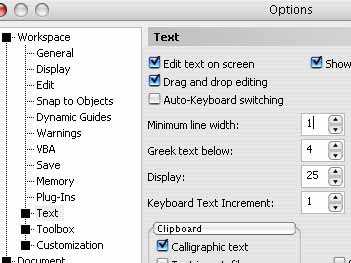
Now from your menu bar go to Tools -> Options -> Text
Step 3
Look for Minimum Line Width property and reduce it from 3 to 1 and click Ok.
All now left is click and drag the bottom handler down so that the text can take up the space and after that push the right side handler inside so that the space of text area is only for a single character.
As you push right side text handler inside you would see the characters shifting down and ultimately only with one single character per line.
You may want to adjust the alignment or character spacing if you want to and that’s it.
Happy designing.

Thanks for the tip.
it was very interesting to read bluzed.com
I want to quote your post in my blog. It can?
And you et an account on Twitter?
@nevenche – Yes, you can quote the post in your blog. Sorry still didn’t joined twitter…
not a big fan of social sites… 😛
May you electronic mail me with most tips & ideas on how you made your web page glance this amazing, I’d be appreciative.
@ Maisha Poche.. Sorry it wont be possible but i am working on starting some sections may be some freebies as well, so say tuned 😉
I am actually pleased to glance at this website posts
which contains tons of valuable facts, thanks for providing these information.
Hey very nicе blog!
You actually make it seem so easy together with your presentation but
I find this matter to be actually one thing that I think I might never understand.
It sort of feels too complex and very large for me.
I am taking a look forward on your next post, I’ll try to get
the hold of it!
This iss the rivht web site forr everyone who wants to understand this topic.
You realize so much its almost tough to argue with you (not that I actually will need
to…HaHa).You definitely put a fresh spin oon a topic that’s been written about foor
a long time. Excellent stuff, just excellent!
I loved as much as you’ll receive carried out right here.
The sketch is attractive, your authored material stylish.
nonetheless, you command get got an nervousness over
that you wish be delivering the following.
unwell unquestionably come further formerly again as exactly the same nearly very often inside case you shield this hike.
It’s difficult to find experienced people in this particular subject, however, you seem like you know what you’re talking about!
Thanks
My site icann.org
With all the latest computer styles today, factors
might have gone easier now.
Very well written post. It will be supportive to anyone who utilizes it, as well as me.
Keep up the good work – for sure i will check
out more posts.
Very well written article. It will be useful to anybody who usess it, including
myself. Keep up the good work – can’r wait to read more posts.
Hey people!!!!!
Good mood and good luck to everyone!!!!!